Select Version of EA Desktop:
To build a data request:
-
In the toolbar, select New. with an auto-generated Request ID.
If you have items for order in your Cart, you can create a new data request directly from the Cart.
A new data request starts in the Building status and is ready for you to enter information and add products.
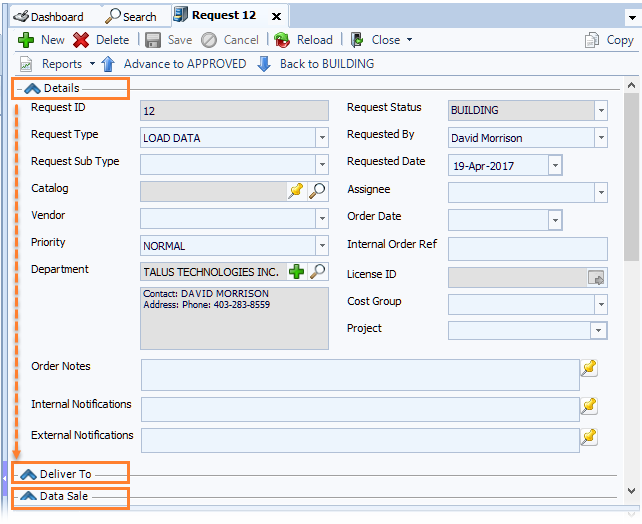
The main area of the workspace is divided into 3 sections for entering information:
Each section can be expanded or collapsed to save screen space.
-
Details: General details and logistics
-
Deliver To: Delivery details including destination and checkout information
-
Data Sale: Sales and licensing information
The lower panel of the workspace includes tabs for adding products, adding and viewing associated information, and accessing historical details.

To build a data request, open a new data request from the Data Request module. In the navigation panel, under Workflows, click Data Request.
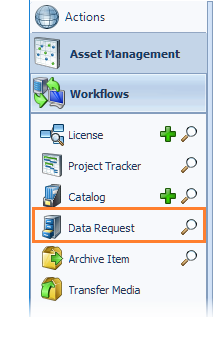
The Data Request module opens in the workspace with an auto-generated Request ID.
If you have items for order in your Cart, you can create a new data request directly from the Cart.
A new data request starts in the Building status and is ready for you to enter information and add products.
The main area of the workspace is divided into 3 sections for entering information:
Each section can be expanded or collapsed to save screen space.
-
Details: General details and logistics
-
Deliver To: Delivery details including destination and checkout information
-
Data Sale: Sales and licensing information
The lower panel of the workspace includes tabs for adding products, adding and viewing associated information, and accessing historical details.